Matt Pocock recently published a write-up on AI Hero called the Home Repo pattern. It describes a setup I've been using for months, and it's the clearest explanation of it I've seen, so I'm happily borrowing his name for it. A home repo is "one repository that holds your skills, your AGENTS.md and your shared docs," with pointers to every other repo so the agent can open or clone them as it needs to.
What struck me, though, was how small it looks on the page. It reads like a bit of workflow housekeeping. But it's much more useful than that.
Nearly every client I work with, as well as most of my own projects, has a single service spread across several code repos. The server code, the client, the documentation, DevOps, and more are all in different places. Start an agent in any one of them and it treats that folder as the whole world. Worse, it might know about the other locations but it operates from its own memory on them, which can be off and miss major parts of the picture. What you need is a single holistic view of the project, not just individual pieces.
A home repo fixes that by changing where the agent starts. Where the agent starts turns out to matter a lot, because the same shift is happening to our own jobs. We're becoming product engineers, not just software engineers, and this is one of the first practical foundations I've found for working that way.
I've also put together a short presentation on the pattern. If you'd rather walk through it visually, or want something to share with your team, you can download the slides (PDF, 1.5 MB).
Why this is really about product engineering
A couple of years ago I wrote that the future of software engineering belongs to people who understand why. If anything, that has arrived faster than I expected. Agents keep getting better at the how, and what's left for us is knowing what the product needs, how the pieces fit together, and whether a change makes sense for the people who use it.
I think of that as product engineering, where you own an outcome across the whole system rather than a single codebase.
Our thinking hasn't caught up with this and it's hurting too many projects and teams. An agent starts in a repository, reads that repository's instructions, and sees that repository's code. When a feature touches the API, the web client, the docs, and the plan, you're the only thing holding those pieces together, and you end up doing repo-level work no matter how you think about your role.
Starting from a home repo moves the edge of the agent's world out to the product. That's where your attention already is. The agent should be there too.
Do you need one?
The signs are usually easy to spot. You're copying context between agent sessions by hand. Or you're asking your agent to look in those repositories for you hoping it'll figure it out. Every repo has its own CLAUDE.md or AGENTS.md, each restating the same coding standards in slightly different words. You improved a skill in one repo while the old copies keep running in the others. Or you spend the first few minutes of every session re-explaining how your system fits together.
Each of those quietly costs you accuracy. Copied context is only as good as what you remembered to paste. Duplicated instructions drift apart, which I wrote about recently in Pathologies of Agentic Development at Scale as agents re-infecting themselves from stale files. And whatever the agent learned about your business domain stays stuck in whichever repo you happened to be in that day.
Matt's article seemed to think Monorepos are a better structure. First, how dare you. Second, it will have its own set of problems and won't work at all if you have shared libraries between products. Monorepos are just deal making to me. Let's embrace the future instead.
What goes in a home repo
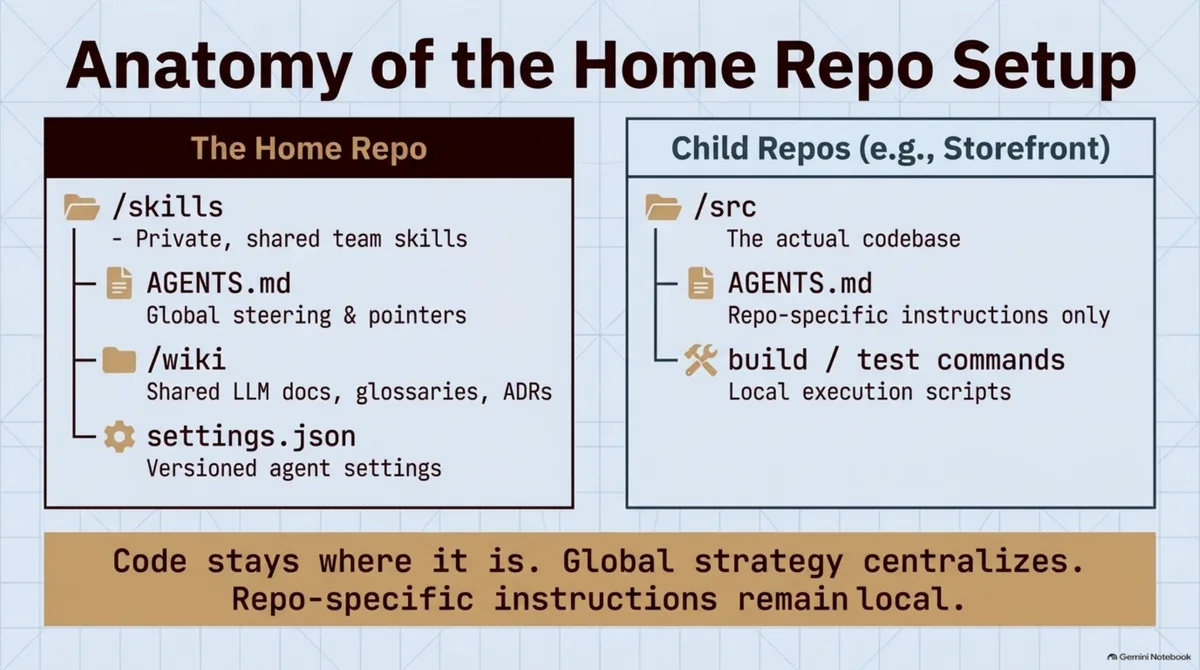
A home repo is just an ordinary git repository. It holds what belongs to the whole product rather than to any one codebase, and the code stays exactly where it already lives. The layout usually looks something like this.
bestla-home/
├── AGENTS.md        # what the product is, where each repo lives, shared rules
├── CLAUDE.md        # one line, "@AGENTS.md", so Claude Code reads the same file
├── .agents/skills/  # shared skills, one folder per skill
└── wiki/            # coding standards, glossary, decision records, domain notes
AGENTS.md does most of the work. Codex and a growing list of other agents read it at the start of every session. Claude Code reads CLAUDE.md instead, but a one-line @AGENTS.md import pulls in the same file, so one copy covers both.
Skills are the reusable instruction files an agent loads when a task calls for one, like cutting a release or reviewing a pull request. Keep a single copy of each here and an improvement lands everywhere at once. Each child repo keeps its own history, its own remote, and its own AGENTS.md for repo-specific details like build and test commands.
Pointing the agent at everything else
The home repo's AGENTS.md carries a short description of the product, a navigation pointer for each repo, and a few rules that apply everywhere. Each pointer is just a local path and a clone URL. A stripped-down version with made-up names looks something like this.
# Bestla customer portal

One product split across three repos. Start every session here.

## Repositories
- Portal API (Python, FastAPI): ~/repos/bestla/portal-api. Clone from git@github.com:bestla/portal-api.git if missing.
- Portal web (Next.js): ~/repos/bestla/portal-web. Clone from git@github.com:bestla/portal-web.git if missing.
- Docs: ~/repos/bestla/docs. Clone from git@github.com:bestla/docs.git if missing.

## Shared rules
- Read a repo's own AGENTS.md before changing it.
- Check a repo's branch and status before relying on it. Only pull into a clean working tree.
- Propose wiki changes as a diff for review. Never edit the wiki silently.
When a task touches the API, the agent goes to that path and clones the repo if it isn't there yet. Every session starts with the product-level picture, and the agent reaches into individual repos only as the work demands. If you share the home repo with a team, agree on a common folder layout so the paths work on everyone's machine.
Claude Code needs one more piece of wiring, since those sibling folders sit outside the directory you launched from. You can grant access with --add-dir, or list the paths under permissions.additionalDirectories in the home repo's .claude/settings.local.json. I think of those as two separate jobs, with the home repo deciding what the agent knows and the added directories deciding what it's allowed to touch.
Neither option brings a child repo's own CLAUDE.md along by default. Directories in settings only get file access, and --add-dir needs CLAUDE_CODE_ADDITIONAL_DIRECTORIES_CLAUDE_MD=1 set before it loads one. That's why the shared rules tell the agent to read each repo's AGENTS.md, and that rule works the same no matter which agent you're running.
A change across three repos still lands as three pull requests, often with a merge order that matters. Ricky Smith describes a nice short-lived variation where he creates a parent folder per task, with a worktree of each repo on the same branch, a PLAN.md to track progress, and a log of every merge request the agent opens. In his words, "The big 'aha' moment was that the parent directory (the branch name) provides a context for the task at hand."
A plan file like that is worth borrowing for any cross-repo change in the home repo, since it keeps track of what has to land and in what order.
How I use it with clients
Client work is where I lean on this the most. A single home repo over the top of a client's repositories helps me maintain memories, consolidate skills, and operate within the context of the application rather than whichever repository I happen to be sitting in.
When the agent works out why some odd corner of the domain behaves the way it does, that goes into the wiki, and it's there the next session whichever repo the work touches. I keep one version of each workflow skill per client instead of several slowly diverging copies. And a feature that spans the API, the client, and the docs gets planned as one piece of work, which is how the client thinks about it anyway.
If you're consulting, decide a couple of things up front. The home repo should sit above the client's repos without changing anything inside them. Their developers and their CI still start in those repos and need the instructions there, even if that means some duplication.
A client home repo also ends up holding a lot of knowledge about their system. It belongs wherever your contract says client material can live, often the client's own GitHub organization, with a clear plan for what happens to it when the engagement wraps up.
Game development is where it really shines
I also run a small game development company, and this pattern is incredibly powerful there. Game projects sprawl across even more repositories than most client work. Design documents are separate from the game code, which is separate from the graphics, which is separate from planning and everything else. Then there's usually a single project management tool over the top that we need to interact with in a consolidated way.
A feature in a game is a design intent, code, art, and a line in the plan all at once, and it isn't finished until they agree. That makes game development about as pure a case of product engineering as I know.
From the home repo, an agent can read the design doc for a feature, check what's implemented in the code, see which assets exist, and update the ticket in a single session. Matt suggests keeping command-line tooling for outside services in the home repo too, and a project management integration fits there naturally.
Be careful with art, though, since graphics repositories are usually huge and often live in Git LFS or Perforce. Give the agent an asset list or a shallow checkout to work from, and tell it plainly never to clone the full art repo on its own.
Where it gets harder
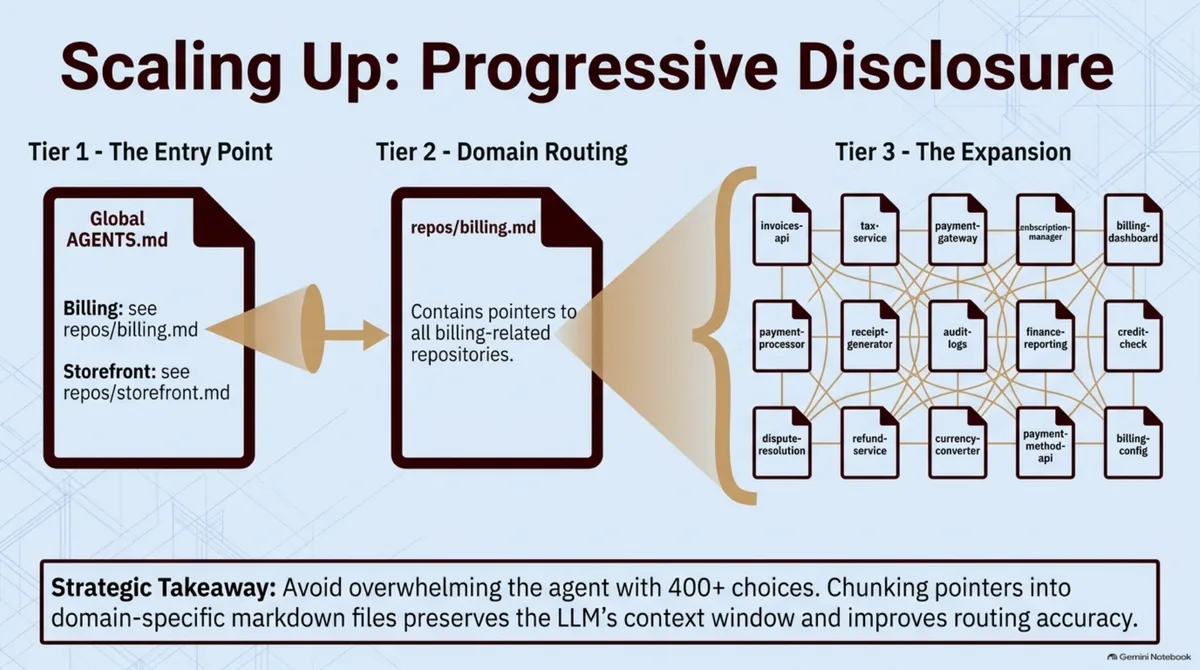
Matt's guidance is that one pointer per repo works fine up to about 20 repos. Beyond that, group them with progressive disclosure. The top-level AGENTS.md points to a file per business area, each of those lists that area's repos, and the agent only reads the part it needs.
If you run several agents at once, use git worktrees. A worktree is a second checkout of the same repo in its own folder, on its own branch. Clone each child repo once and give each feature its own worktree, and the agents stop stepping on each other's changes.
The bigger risk is the one I spent my last article on. A home repo, and its wiki in particular, can turn into a junk drawer. Instructions pile up, nobody remembers why a rule was added, and the single source of truth quietly becomes a single source of stale truth.
An agent writing notes and later reading them back as gospel is exactly how bad ideas spread. So I treat wiki changes the same way I treat core design documents. The agent can propose a change, a person reads the diff, and it only gets committed if it's true. Every so often, somebody also has to read through AGENTS.md and the wiki and cut whatever no longer holds.
Setting one up
Start with one product that spans a few repos and create the basic structure.
mkdir bestla-home && cd bestla-home && git init
mkdir -p .agents/skills wiki
echo "@AGENTS.md" > CLAUDE.md
Then write the AGENTS.md. Open with a short paragraph on what the product is and who it's for, since that's the one piece of context the agent can't get from any single repo. Follow it with a pointer for each repo and a handful of shared rules.
Move your coding standards into the wiki, and pick the best copy of a skill or two you've duplicated across repos and move it in. If you're on Claude Code, either keep skills in .claude/skills or symlink that folder to .agents/skills, then add the sibling repo paths to permissions.additionalDirectories.
Now run your next cross-repo task from the home repo and watch how differently the agent approaches it. In repos you own, once you trust the home repo's version of a rule or skill, delete the old copies so they can't drift back in.
If you're dealing with a lot of repos, Matt's post includes a setup prompt that has the agent inventory everything and sort it into shared, duplicate, repo-specific, and installed buckets. It won't change anything until you approve the plan.
A small change in where we start
It's funny how small this change is compared to how much it shifted the way I work. Moving the starting point from a repository to the product sounds like housekeeping. In practice, it lines the agent up with the job we're all growing into.
The engineers who do well from here will be the ones who understand the whole product and why it exists, and who let the agents carry more and more of the how. Our tools should start from the same place we do.
I'd love to hear how others are handling multi-repo work with agents. Are you running something like a home repo already? And do you see it as part of the move toward product engineering, or just a handy trick?